
Contents
Recently, a Slack channel inside our company started filling up with incident reports written by an AI agent our team deployed in a Kubernetes cluster. The agent spotted failing pods and broken configurations, then explained each problem with a probable cause and provided a recommended fix.
Actually, our engineers broke those pods and configurations ourselves, on purpose, to see what the agent would detect.
At first glance, the AI agent behind those reports looked like a magic wand. So we went through the results to understand whether the agent was actually worth using and where the risks might be.
Here’s what we think.
How We Set Up the AI Agent in Kubernetes
Our team used kagent as the base for the agent that investigates Kubernetes incidents.
Kagent is an open-source framework for building AI agents that operate inside a Kubernetes cluster. Thanks to this framework, you don’t have to build your own connection between an LLM, Kubernetes, and tools like kubectl. Kagent provides this capability out of the box. What you control is whether the agent is allowed only to report problems or also to take action.
We chose the reporting route—the agent finds problems and explains them, and a human decides what to do next. When a pod fails, the agent investigates it on its own and sends a Slack report explaining where the issue is, what likely caused it, and how it would recommend fixing it.
Actually, we used the agent-to-agent approach: we split the workflow between two agents: a simple watcher for detection and a separate LLM-backed agent for investigation. The watcher is a small program that runs on the cluster’s own resources. It checks the namespaces and monitors pod states.
The moment the watcher notices an incident, it hands the case to the second agent and points it at the failed pod. The second agent goes straight there and gathers the same details an engineer would check by hand: the pod’s status summary and its logs.
It then passes both to the LLM. The LLM returns a short report with context and recommendations, and the report reaches our Slack channel through an MCP server running inside the same cluster.
Why split it into two? Money. The LLM is the expensive part, since you pay for every call. So we only trigger it once the watcher has found a real incident. The rest of the time, only the lightweight watcher is active, and it costs almost zero.
What AI Detected When We Broke the Cluster on Purpose
To test the AI agent, our DevOps Engineer Denys Smetaniak deliberately broke the cluster in several different ways, so he could see what the agent would notice and what it would miss.
The agent correctly identified every failure he staged, and it didn’t invent any false problems.
Here’s exactly what it detected:
- A conflict the agent found by comparing the resource limit arguments
- An error in the logs pointing to a network problem
- A DNS error while resolving a URL
- Pods hung in Pending status
The AI agent also wrote a readable diagnosis for each issue. Here’s the assessment from Volodymyr Surnyk, our DevOps Team Lead, after he reviewed the reports:
“Everything the agent reported, I could have seen with my own eyes and reached the same conclusions. But it had already done the digging. It had already gathered the information and pointed to the likely cause. That’s not bad at all.”
We also tested consistency. Denys triggered the same error repeatedly to check whether the agent would start producing inconsistent or invented answers. It didn’t. Each time, the diagnosis remained the same, with only minor differences in wording, similar to how a person rephrases the same idea when explaining it twice.
One thing to keep in mind: these were controlled test scenarios. Whether the agent can pinpoint the real cause just as well on a live production cluster, where problems are larger and less predictable, hasn’t been verified yet.
Why We Don’t Allow AI to Act on Its Own Yet in Live Environments
AI observes the cluster and recommends what to do. It doesn’t carry out any actions itself, not even simple ones like restarting a pod. Our team made this decision for two reasons.
Reason one: keep the evidence intact. To put it as an analogy, an incident is like a crime scene. No one should alter it before the investigation is complete.
“If an agent acts on its own, the evidence can disappear. Restarting a failed pod can erase its logs along with the exact state the system was in at the moment it broke. The service comes back, looks healthy again, and we lose our only chance to understand what actually went wrong.”
Volodymyr Surnyk, DevOps Team Lead at IT Outposts
Reason two: we can’t rely on AI giving the same answer every time.
Yes, the agent was consistent in our tests. But a few controlled tests still prove very little. An AI agent can diagnose a problem correctly today and reach the wrong conclusion on the same problem tomorrow.
As Volodymyr explained:
“An agent might restart a pod correctly ninety-nine times, and the hundredth wrong command can take down a live service.”
Plus, a real cluster may have problems that test environments have never reproduced before.
This is why we limit what AI is allowed to do, and the data also shows how much this matters.
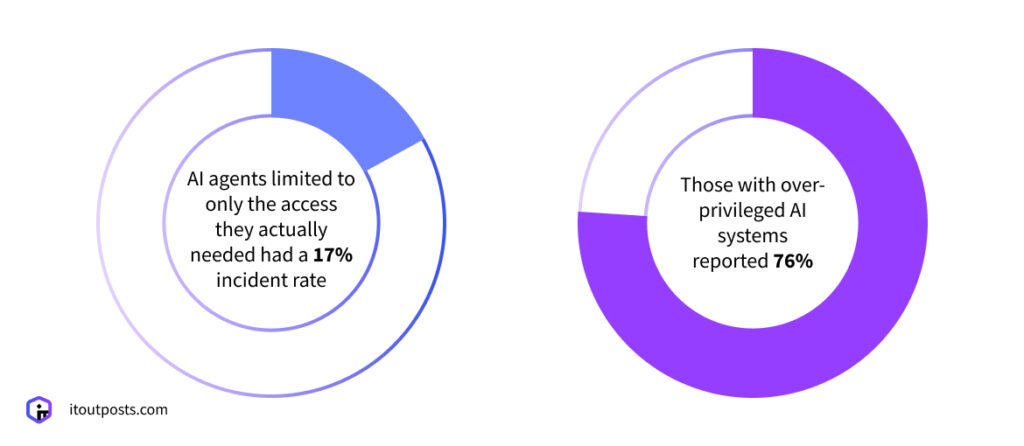
Teleport’s 2026 State of AI in Enterprise Infrastructure Security report, based on interviews with 205 security leaders, found that organizations giving AI systems excessive access experienced a 76% incident rate, compared with 17% among those that granted only the privileges each task required.
At the same time, we do remain open to giving AI agents more autonomy in the future, as the models themselves improve and as we run more tests. In fact, the next round of tests is already planned: to give the agent a short, pre-approved list of actions, such as restarting a pod, that it can run only after human approval.
If the Agent Only Watches, Why Not Just Use Prometheus and Grafana?
At this point in our discussion, a natural argument comes up:
By limiting the AI agent to observing and reporting, we’ve made it do much the same work as a standard monitoring tool.
And this is the exact argument our COO, Nataliya Piskun, raised during our meeting to challenge the value of an agent that only observes: If that is the agent’s entire job, why not rely on the Prometheus and Grafana stack we already rely on?
The answer is that they perform different functions, and the distinction matters. The agent reads the cluster’s current state and interprets what it means. Prometheus and Grafana collect and store metrics over time. We can rely on both.
So the agent works on top of your monitoring stack, reading the raw data and giving you a clear answer. And this saves you time, because you no longer have to gather and read through all that information yourself before you can act.
How the AI Agent Saves Time
The agent’s real value, as Volodymyr noted earlier, is that the investigation is already complete by the time the engineer opens the alert. And the investigation is where the time goes. Typically, it takes an engineer 15 to 30 minutes, depending on the complexity of the problem and how often they have handled that type of failure before.
By the time an engineer opens Slack, the preliminary work is already done. The engineer still has to review an agent’s findings, of course, but they begin with a working hypothesis.
“We save the time we’d normally spend just collecting information. And this gives us what counts during an incident: room to think and make the decision.”
Denys Smetaniak, DevOps Engineer at IT Outposts
How We Plan to Test AI Agents Further
So far, we’ve described one agent doing one job: analyzing incidents. But the same approach, a restricted agent that analyzes cluster data and reasons about it, fits a lot of related tasks. Here are a few more areas where our team is considering testing AI agents:
- Metrics analysis with Prometheus and Grafana. Our current test agent focuses on logs and events. We haven’t connected it to Prometheus or Grafana yet, so the plan is to do exactly that, letting agents analyze the metrics they collect and flag unusual patterns like a sudden spike in CPU or errors.
- Anomaly detection. A standard alert can indicate that traffic spiked, but not whether the spike is normal. The aim is for an agent to make that distinction, separating organic growth from abnormal behavior. This is actually where AI performs well, since identifying patterns is one of its core strengths.
- Version audits. Reading a changelog and judging which entries are relevant is not unique on its own; ChatGPT can do that too. What an agent brings is context: it knows your stack, the tools and versions, so it can judge whether the release is worth upgrading to. Engineers often find this task tedious and tend to postpone it; however, a delayed update can leave a serious security vulnerability unpatched.
- Cost optimization. An agent could also monitor resource usage and show you that you’re using more than you need. For instance, you may have too many replicas for your actual traffic. In this case, AI could recommend reducing them and configuring a Horizontal Pod Autoscaler (HPA) instead.
So, Is an AI Incident Analyst a Magic Wand?
If we’re talking particularly about incident analysis only, AI can be that magic wand that saves you time on collecting and reading through the data before you can act. An AI agent can be worth deploying in such a scenario, provided the access is tightly restricted and a human makes every final decision.
When speaking about areas going further than pure analysis, like restarting a pod, the position we took in our earlier article on whether AI can replace DevOps engineers remains the same: AI analyzes; it doesn’t intervene. (Although we stay open to expanding what AI agents can do in our workflows as they prove themselves).
If you’re weighing whether AI-based incident analysis fits your infrastructure, we can help you find out.
Talk to our IT Outposts team about AI agents in your infrastructure.

I am an IT professional with over 10 years of experience. My career trajectory is closely tied to strategic business development, sales expansion, and the structuring of marketing strategies.
Throughout my journey, I have successfully executed and applied numerous strategic approaches that have driven business growth and fortified competitive positions. An integral part of my experience lies in effective business process management, which, in turn, facilitated the adept coordination of cross-functional teams and the attainment of remarkable outcomes.
I take pride in my contributions to the IT sector’s advancement and look forward to exchanging experiences and ideas with professionals who share my passion for innovation and success.