
Contents
AI has already made its way into coding, as well as CI/CD, infrastructure provisioning, and other DevOps workflows. Now the conversation is turning to SRE.
AI product vendors promise faster incident response, less manual investigation, reduced alert noise, and more. Some of their promises hold up.
But some don’t.
If you want to understand what AI can realistically do for your SRE practice in 2026, in this article, we at IT Outposts provide a grounded overview:
- What the technology actually delivers today
- Where it still falls short
- And what questions to ask before you invest in an AI-powered SRE tool
AI for SRE Is Already Inside Your Stack
Over the past years, most major infrastructure vendors introduced or expanded AI capabilities specifically for SRE workflows:
- Google’s SRE teams use Gemini CLI as an incident-response copilot for triage, mitigation, root-cause analysis, and postmortems
- AWS launched its DevOps Agent
- Dynatrace extended its observability platform with agentic AI capabilities
You can also notice a range of standalone products in the market specifically for AI-driven SRE. For instance, Resolve.ai, Sherlocks.ai, and Rootly.
When this many vendors move in the same direction, it’s worth paying attention. So what do AI-driven SRE tools actually do today?
What Does AI in SRE Actually Mean Right Now?
AI SRE uses machine learning, including large language models, to automate parts of site reliability engineering, primarily incident detection, investigation, and resolution. These tools scrutinize signals throughout your stack with an aim to inform you what has malfunctioned, the reason behind it, and the next steps to take.
Even a year or two ago, many AI-for-operations tools didn’t go much further than summarizing metrics and correlating alerts. This was useful, but not often sufficient to make a real change in how teams resolve incidents.
In 2026, the tech has improved. Now these tools are able to perform parallel investigations across logs, traces, deployment histories. They create hypotheses, check them with your telemetry, and show likely causes in a ranked order.
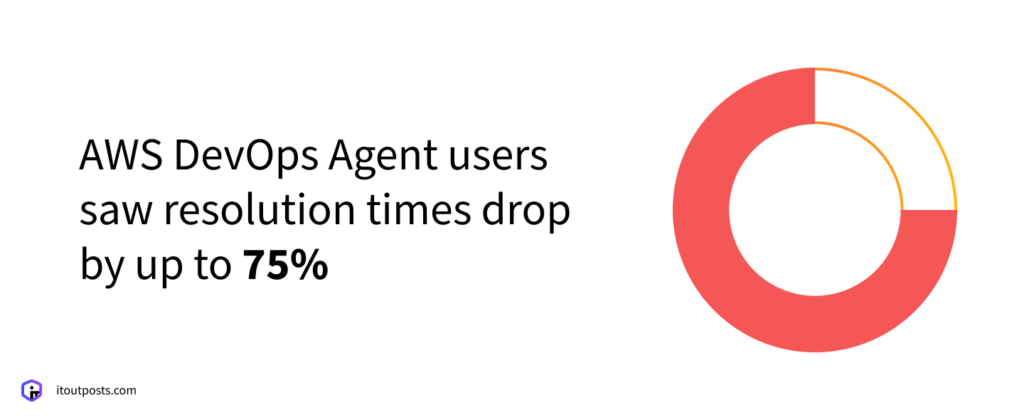
What kind of outcomes can AI produce for SRE teams? For example, in some cases, the tooling has the capability to meaningfully reduce mean time to resolution (MTTR). AWS reports that customers of its DevOps Agent saw resolution times drop by up to 75%.
However, the extent of this reduction depends on context.
Often, it is the organizations with teams that already have clear observability data and well-organized postmortems who achieve the greatest reductions in MTTR.
As IT Outposts COO Nataliya Piskun put it in a recent internal discussion:
“AI amplifies what was already working. It’s less effective when the basics aren’t in place yet.”
So, whether AI will change your team’s reliability practice or not also depends on factors that are unrelated to AI itself.
Where AI Can Help in SRE
Here are the areas where AI-powered tools and features already exist and are used by SRE teams.
Deployment verification
Certain AI tools have the ability to verify if a new deployment is functioning properly by comparing metrics from before and after. If the metrics after deployment look abnormal, the team can get a signal and, thus, a chance to roll back before an issue reaches users.
Some platforms can also trigger rollbacks automatically, but it’s a significant decision that requires deep consideration of whether to give AI the authority to make changes in production. AI might not fully understand what exactly happens across all business operations at that particular time, and a wrong rollback can lead to a disruption itself.
Alert correlation and noise reduction
In complex environments, on-call engineers can face hundreds of alerts per incident, and some can be symptoms or merely duplicates.
AI-driven alert correlation can help by recognizing that multiple alerts come from the same basic problem and show them together, saving engineers time, as they don’t have to check each one individually. Additionally, AI tools can remove brief alerts that solve themselves and send remaining ones automatically to appropriate teams.
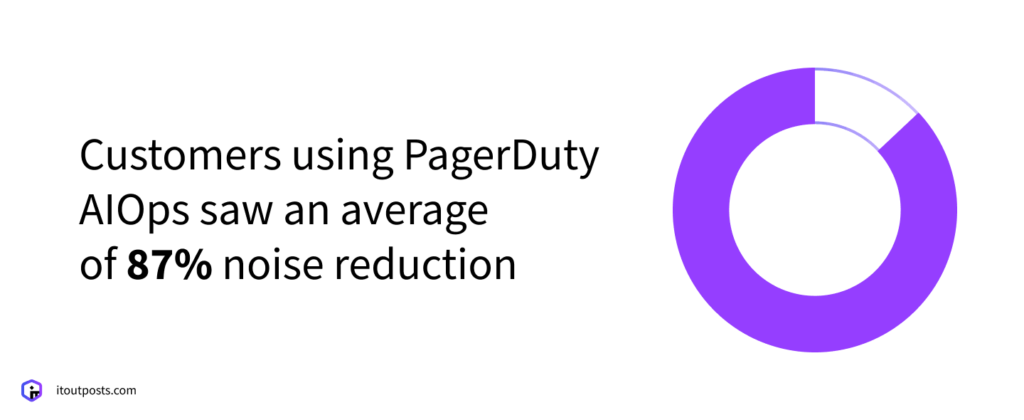
According to PagerDuty, early access customers of its AIOps product, including SRE and ITOps teams, saw an average of 87% noise reduction. It’s important to note, however, that this figure has been provided by the vendors themselves.
As we mentioned earlier, the actual results also depend heavily on what your existing setup looks like. If there is an inconsistency in the labels of your alerts, the absence of metadata, or service maps not set up properly, AI tools may find it difficult to associate signals and provide useful insights.
Also, while AI can reduce some toil, it also introduces its own. It still requires humans to be involved: for setting it up, checking its results, and tweaking its behavior. We’ll cover this in more detail in the section on the limitations and tradeoffs of AI in SRE.
Incident diagnosis
Often, much time in solving a problem is spent on figuring out what the issue exactly is: finding which component isn’t working properly, tracking any changes that may have caused it, and understanding why this happened at all.
AI tools can assist across all three steps. They can map service dependencies to isolate the failing component and check what was newly deployed or changed and compare the timing of these changes with when the issue began.
AI root cause analysis tools often use retrieval-augmented generation (RAG) to go further: they examine logs, traces, and past incidents to offer a probable reason explaining why any changes might have played a part in the issue.
Yet, again, the quality of results depends on the quality of the operational data available to the system. If your team writes detailed postmortems and keeps logs structured, AI has a lot to work with.
But when an issue has no precedent in your environment? The tool has nothing to match it against.
In these situations, it may still attempt to provide you with an answer. The issue is that this response could potentially be incorrect.
Knowledge preservation
And even if you don’t have much historical data today, AI can start building it for you.
Some AI SRE platforms index incidents, incident-channel conversations, postmortem drafts, and runbooks.
This is particularly valuable when experienced engineers leave and take years of context with them.
You won’t have the history from before you adopted the tool, but from that point on, the knowledge will stay with your team.
The Limitations and Tradeoffs of AI in SRE
We’ve already discussed one of the core limitations: AI tools depend on clean, structured operational data to perform well. But there are a few more limitations, as well as tradeoffs.
The hallucination problem applies to incident response, too
You’ve probably seen it yourself when using ChatGPT or similar tools: sometimes the answer sounds perfectly reasonable but turns out to be wrong. AI agents in SRE are susceptible to the same problem.
The difference is that during an active incident, the cost of an incorrect output can be much higher.
While AI reduces noise, it adds new toil
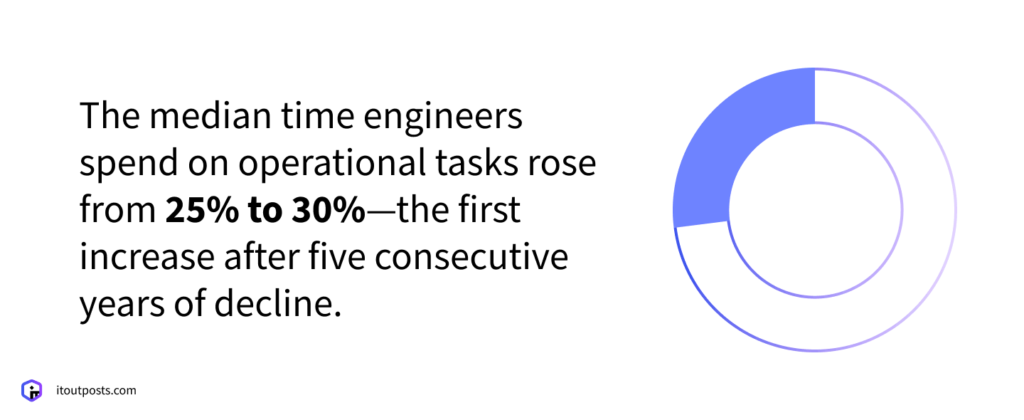
The Catchpoint SRE Report 2025 says the median time engineers spend on operational tasks rose from 25% to 30%. This is the first increase after five consecutive years of decline.
But why has the burden of operational tasks risen now, even though AI SRE tools are more available than at any time before?
AI tools can help your SRE team work faster, but they also create work of their own. Someone needs to tune its behavior and review the AI’s output.
Laura de Vesine, Senior Staff Engineer and contributor to the report, mentions this as one of the potential reasons as well:
“Manual supervision of AI systems that are mostly right, or make subtle and hard-to-predict errors, can easily raise the operational load of a team for both day-to-day work and incidents.
We all know that a co-worker you can’t trust is a constant source of extra work… and AI is at best a co-worker you can’t trust.”
So, it’s worth accounting for the extra work AI tools require so as not to end up replacing one type of manual work with another while also paying for an AI agent on top of it.
Autonomous fixes are still too risky
As we discussed earlier, an incorrect rollback can cause its own outage. But it goes beyond rollbacks.
Auto-remediation means AI decides to restart services, scale infrastructure, or change configurations in production. Each of these actions has consequences that depend on the context the AI may not fully have: ongoing deployments, business-critical traffic windows, dependencies on other teams’ systems.
If your environment is complex, it becomes difficult for any automatic system to consider all these factors.
When it comes to how our team at IT Outposts uses AI in SRE, it observes, it doesn’t act. We give AI tools access to monitor and surface issues. The tool can identify a problem, explain what’s likely causing it, and recommend next steps.
But the decision to act in production always stays with the engineer.
In a nutshell, AI has tradeoffs, and understanding them in advance can help you avoid creating workflows that could be less efficient than what you originally had without AI.
Such limitations and tradeoffs also mean AI can’t replace your DevOps (or SRE) engineers. Their day-to-day may just look different: less manual investigation, more reviewing AI output, setting guardrails, and making decisions AI can’t be trusted with yet.
How IT Outposts Applies AI in SRE for Our Clients
We use AI as part of our SRE practice, and we’ve seen firsthand where it adds value and where it needs a human next to it. Here are two examples from our recent work.
AI-assisted SRE for a global martech company on GCP
Our client is a global digital marketing technology company supported by a significant investment group. The company has 18 offices and more than 800 staff members. They provide services to famous brands in various sectors such as retail, luxury, and telecom. The organization develops AI-based products for search optimization and creative analytics.
We began our work in 2023, focusing on Google Cloud Platform (GCP) project management at a large scale and developing the CI/CD pipelines. In 2026, our team focused on incident management workflows and an AI SRE readiness assessment.
As the client’s product ecosystem grew, the infrastructure did too. More AI-powered products meant an increase in clusters and services. Their own clients pay for real-time insights, so downtime is a problem not just from a tech perspective but also business-wise.
We chose Gemini Cloud Assist as the AI SRE tool. Because all of the client’s infrastructure is on GCP, it made perfect sense: Gemini Cloud Assist fits naturally well. It works straight within the GCP console and with existing monitoring tools in use.
When a high-priority alert comes in, the AI analyzes metrics, logs, and configuration changes, and ranks probable causes. As a result, the client’s engineering team begins with a direction—a probable cause—rather than spending 15-20 minutes collecting context from various sources.
Ultimately, the team can now respond to incidents faster without having to scale the on-call team proportionally, which matters as the client’s infrastructure continues to grow.
AI-powered incident response for a sports industry client
Another client operates the digital infrastructure behind a professional European football club. The setup is based on Kubernetes and needs to process match data in real-time. Traffic increases sharply on match days, so we needed to make sure incidents are caught and resolved as fast as possible.
That’s why we implemented an AI-assisted incident response system using kagent, a Kubernetes-native agent with read-only access to the cluster. It connects to kubectl and Prometheus and sends alerts with pre-diagnosis context to Slack.
Once an alert is triggered, the agent checks pod status, pulls logs, and queries metrics, then delivers a short summary to the engineer. The engineer receives the context-rich alert. Here’s how the flow works:
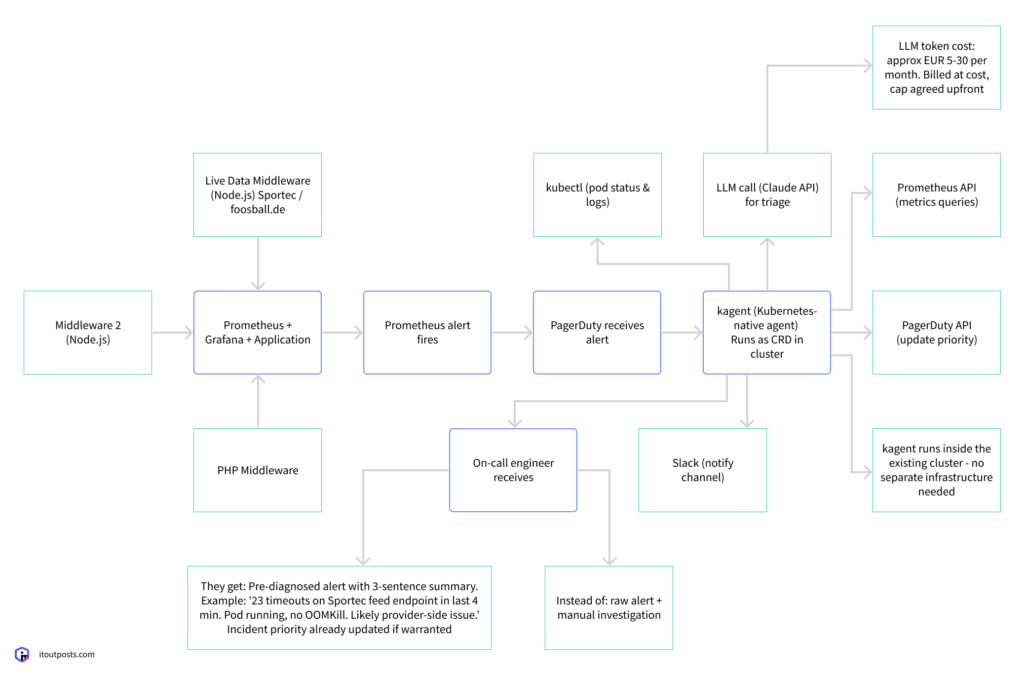
The agent is deployed inside the existing cluster, no extra infrastructure required. The only extra expense will be LLM API tokens, which at anticipated levels of use could cost around €5-30 each month.
A live ticker outage during a match can be visible to thousands of fans. Thanks to the system our team developed, the client’s team can act on the problem immediately.
How to Pick the Right AI Tool for Your SRE Practice
Which tool you adopt matters as much as how you use it. The market for AI SRE tools is growing, so if you’re evaluating options, this is what we suggest to check out initially.
Understand your actual bottleneck first
Before assessing any tool, consider where your team spends the most time during incidents:
- Detecting problems (your monitoring is weak)
- Investigating them (you detect fast but diagnose slowly)
- Coordinating the response (the technical fix is quick, but the communication is chaotic)
- Different tools address different bottlenecks.
Make your operational data AI-ready
As we’ve already established, your AI tool will only be as good as the data you give it.
This is the reason it’s crucial to ensure your observability stack generates tidy, organized data that an AI tool can really use. If your team doesn’t document incidents in detail yet, starting this practice will make any future AI tool you employ far more useful.
Match the tool to your architecture
Complex microservice environments need tools that can trace failures across service boundaries and understand causal relationships between components.
But if your setup is a simpler architecture with clearer failure points, it doesn’t require deep agentic investigation. You may only need a lighter tool that speeds up data retrieval and summarization.
Additionally, ensure the tool suits your existing stack. Generally, AI SRE tools often fall into four categories:
- Cloud-provider-native AI, like AWS DevOps Agent. When your infrastructure is mainly on one cloud, this provides you with AI SRE that has thorough access to the services and data of that provider. This is frequently the simplest method to begin with.
- AI features inside existing observability platforms like Datadog Bits AI or Dynatrace Davis AI. If your team already uses one of these platforms, this is another low-friction way to start with AI.
- AI-first platforms like Resolve.ai, Sherlocks.ai, or Traversal are created with AI at their core. These will be a new addition to your stack.
- Open-source stack plus an LLM layer where you assemble your own stack from, for instance, Prometheus and Grafana, and connect them to an LLM. You avoid platform licensing fees, but you take on the cost of hosting, integrating, and maintaining the setup yourself.
Check how pricing works at your scale
Pricing models in this space vary. Here are the ranges we’ve seen while researching the AI-powered SRE tooling market:
- Per-investigation pricing ($15 to $30 per investigation, often sold in packs) can become unpredictable at high incident volumes
- Per-user pricing ($20 to $100 per user per month) scales with team size
- Flat platform fees ($1,500+ per month) suit mid-size teams with consistent usage
- Enterprise contracts ($1M+ per year) target large organizations
It helps to map your incident volume and team size to each model before starting demos.
Measure your current performance
Before you decide to use a tool, also evaluate your current MTTR, alert-to-incident ratio, and weekly hours spent on manual investigation. By doing this, you can make a comparison of these measures before and after using the tool to confirm if it is effective for you.
The Questions Worth Asking Before You Adopt AI in SRE
Overall, if you’re managing complex infrastructure and considering AI for SRE, the main questions to start with are:
- Will the benefits outweigh the tradeoffs in your specific situation?
- If so, do you have the operational maturity to get value from AI now? If not, what needs to change first?
If your team needs help answering them, whether this means assessing your readiness for AI, improving your observability data quality, or evaluating which AI tooling actually fits your environment, that’s what we do at IT Outposts.
Reach out to start with a grounded assessment of your SRE practice and build an AI adoption plan that makes sense for your team.

I am an IT professional with over 10 years of experience. My career trajectory is closely tied to strategic business development, sales expansion, and the structuring of marketing strategies.
Throughout my journey, I have successfully executed and applied numerous strategic approaches that have driven business growth and fortified competitive positions. An integral part of my experience lies in effective business process management, which, in turn, facilitated the adept coordination of cross-functional teams and the attainment of remarkable outcomes.
I take pride in my contributions to the IT sector’s advancement and look forward to exchanging experiences and ideas with professionals who share my passion for innovation and success.