
Contents
Our client started with a simple but powerful idea: bring all the old-school paper promo booklets into one digital, location-based app. With its help, users can open the app and see discounts from multiple stores in one place.
When we joined the project, it was at the MVP stage. The product itself was in active development, and the team had already set up Kubernetes, a container orchestration tool, which gave them a solid foundation. However, the infrastructure wasn’t yet ready for geographic expansion. It worked well for building features, but not for:
- Onboarding thousands of users
- Launching simultaneously in several European countries
- Preparing for the longer-term goal of global rollout
Before we could even think about the expansion plan, there were a few critical things we needed to handle. We reorganized our client’s Kubernetes architecture into a clean, country-based namespace model, implemented a CI/CD pipeline, and upgraded monitoring
Only once the architecture became stable, transparent, and manageable did we move on to designing how it should grow.
That’s when the project’s leadership requested a clear, long-term roadmap that would outline:
- How to scale inside their current cloud provider and what must change at specific growth milestones (5k, 30k, 100k+ users).
- Pros and cons of staying on DigitalOcean vs. moving to an on-premise setup
- A full disaster recovery strategy
In the next sections, we’ll walk through how that expansion plan was created, step by step, and the final direction we recommended for the project’s future growth.
Assessing Our Client’s Starting Point
Having already worked within the project’s environment, we had a solid understanding of its architecture, performance characteristics, and constraints—the foundation we needed for the expansion plan.
The team had invested in a modern cloud-native setup, and a lot of the groundwork for future scaling was already there.
The project is hosted on DigitalOcean (EU Frankfurt), which is a practical choice for early startup phases: predictable pricing, simple management, and enough power to get an MVP off the ground.
On top of that, the product is running in a Kubernetes-based architecture designed with multiple critical components:
- A Kubernetes cluster combining scalable and static node pools
- A primary PostgreSQL instance plus a replica
- Redis
- Elasticsearch
- RabbitMQ
- DigitalOcean object storage for logs and crawler images
- An internal Docker registry
- Cloudflare
- A monitoring stack built around Grafana, Prometheus, and Zabbix (used specifically for parsers)
Here’s the current infrastructure scheme:
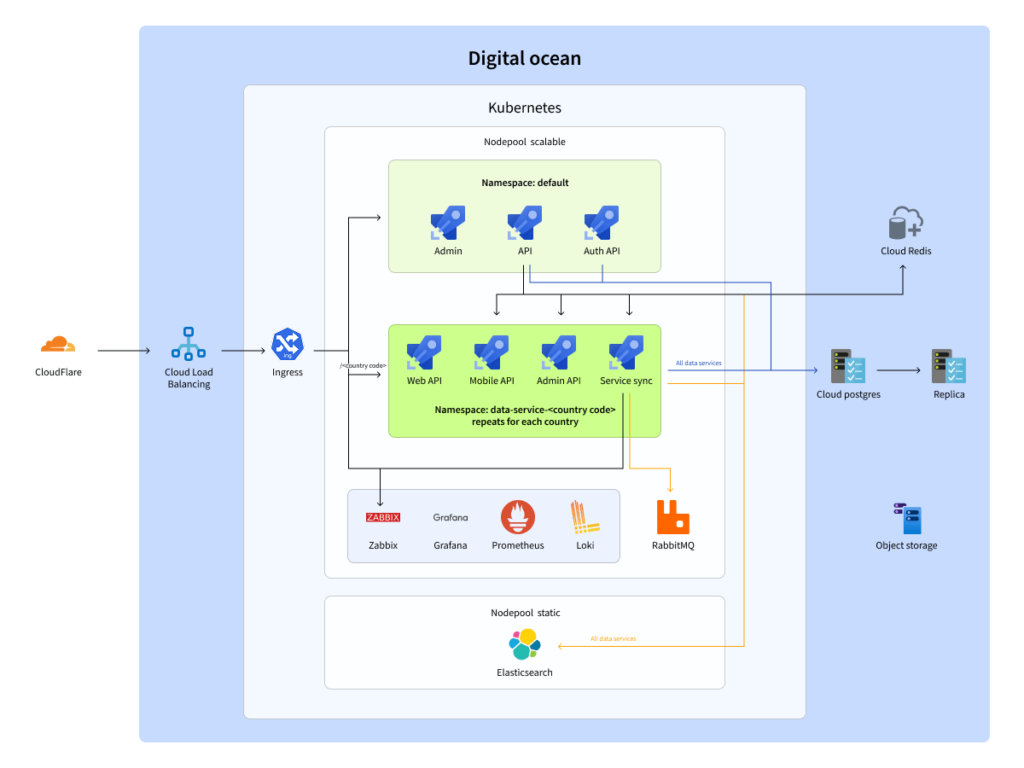
One of the strongest parts of the setup is the namespace-per-country model. Each country—Poland, Germany, Slovenia, and others—has its own namespace in the Kubernetes cluster. Each namespace contains everything that region needs, while shared components are centralized. This structure is already aligned with our client’s plan to expand across Europe.
Business and Technical Drivers Behind the Expansion Plan
The client outlined a set of non-negotiable requirements for the infrastructure:
- Support for growth from 5k → 30k → 100k users and beyond
- High stability and built-in redundancy
- A disaster recovery strategy, with clear expectations on recovery time and data loss
- Predictable, controllable infrastructure costs that can be explained to stakeholders
- Compliance with GDPR and local regulations in every country where our client operates
- Strong observability: monitoring, logging, and regular security and infrastructure audits
Common Recommendations Before Scaling
We also shared a set of general recommendations. These improvements were universal optimizations that would help our client save money, reduce risks, and prepare for smoother future growth.
Here are the main recommendations our team provided:
- Make better use of Redis. Redis was technically there, but not working to its full potential. Proper caching would take pressure off PostgreSQL and Elasticsearch, speed up responses, and lower cloud costs. If caching wasn’t going to be used actively, removing the underutilized instance was also an option.
- Optimize PostgreSQL costs. DigitalOcean’s managed replica was convenient but expensive for an MVP. We suggested switching to a backup-based recovery approach—hourly and daily DB dumps stored in DigitalOcean Spaces.
- Add missing GDPR components. Because of our client’s goal to operate in multiple European countries, compliance couldn’t wait. We recommended adding consent-management tools and data export/delete endpoints. These can live inside Kubernetes or be handled through external SaaS solutions.
Disaster Recovery Plan: Preparing the Project for the “What If”
Scaling isn’t only about adding more resources but also about making sure the system stays alive when components break. For our client, this is especially important because the platform works with real-time data, regional deployments, and user activity spread across multiple countries.
To keep the infra reliable, our team designed a disaster recovery (DR) plan that works for both cloud and on-premise setups:
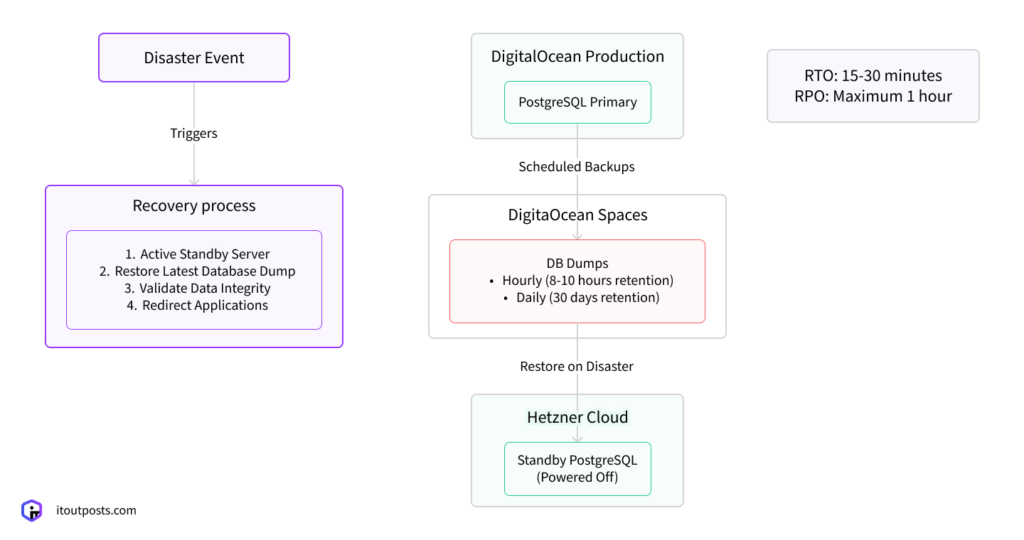
The idea was to create a process that is predictable, testable, and cost-efficient, with no unnecessary complexity. Here’s the DR strategy we recommended.
1. Regular Database Dumps
The first layer of protection is frequent, automated backups. The backup schedule looks like this:
- Hourly DB dumps, kept for the last 8–10 hours
- Daily dumps, kept for 30 days
2. Standby Database on a Budget-Friendly Provider
So as not to pay for a full-time managed replica (which is costly), we proposed using a more lightweight model:
- Deploy a standby PostgreSQL server on a low-cost provider like Hetzner
- Keep this server powered off by default to save money
- In case of a failure, power it on and restore the latest database dump
3. Recovery and Testing Process
A recovery plan is useless if it isn’t tested. That’s why our team included a clear routine that ensures both the backups and the failover mechanism actually work:
- Document the entire process and train the team
- Run quarterly recovery drills to make sure the team can switch to the standby DB quickly
- Verify backup integrity regularly
Expected Results
Based on the architecture, our client can expect the following outcomes:
- Recovery time (RTO): 15–30 minutes (depending on database size, this may vary)
- Maximum data loss (RPO): up to 1 hour (assuming the most recent backup is intact)
- Lower operational cost compared to maintaining a constant real-time replica
This DR strategy strikes a balance between safety and cost-efficiency, which is ideal for a product in the middle of rapid market expansion.
Scaling Inside DigitalOcean: What Growth Looks Like for Our CLient
The next step was predicting how the infrastructure should evolve as the user base grows and how much this growth would cost.
We created a forecast that shows the exact actions needed at three major user milestones: 5,000, 30,000, and 100,000 users.
Up to 5,000 Users: Stay Lean and Optimize
The main goal here is to remove costly components that don’t add value yet and tighten up caching:
- Remove the PostgreSQL-managed replica
- Improve Redis usage and caching patterns
Up to 30,000 Users: Prepare for Real Traffic
Once the app reaches tens of thousands of users, traffic patterns become heavier and more predictable. Search, indexing, and APIs begin to feel the impact, so the system needs smarter scaling. At this stage, we proposed:
- Introducing a hot–warm Elasticsearch architecture (active indexing + historical storage)
- Enabling horizontal autoscaling in Kubernetes
- Increasing Redis memory and optimizing cache strategies
Up to 100,000 Users: Think Multi-Region
Crossing the 100k mark means the app is no longer a local MVP but a platform used across multiple countries with different latency expectations. For this milestone, we recommended:
- Horizontal scaling with multi-region clusters
- More advanced caching layers (Redis Cluster/Redis Sentinel)
- Database segmentation via sharding or region-specific PostgreSQL clusters
DigitalOcean Scaling Cost Projections
Cloud costs grow proportionally to resource consumption. We mapped out the approximate cloud costs for each scaling milestone:
- Moving from the early MVP stage to the next traffic milestone increases the cloud bill by around 100%, doubling the monthly spend.
- Scaling further toward six-figure user counts adds another 100% on top, doubling it again.
- When you compare the smallest stage to the largest one, the overall growth in cloud spending reaches 4×.
This calculation is very approximate and only shows the price range for increasing resource capacity in a single region with the current provider. Depending on client behavior and the number of concurrent requests, we can handle a load of up to 100,000 users with the current resource capacity.
Performance Expectations
We also defined a set of metrics that our client’s engineering team should monitor closely as the product grows. Here are the key expectations:
- CPU & RAM utilization: stay below 75% during peak times
- Response latency: keep API responses under 200 ms
- Error rate: maintain below 0.5%
- Redis cache hit ratio: aim for over 80%
Migration Plan: Moving from DigitalOcean to an On-Premise Setup
Part of our client’s long-term strategy was to understand what a future migration to dedicated hardware could look like, as a documented “on-prem path” gives the team flexibility, cost control, and independence if traffic or geography grows beyond what the current provider can handle.
We delivered the following scheme of the infrastructure on physical servers, taking into account fault tolerance requirements:
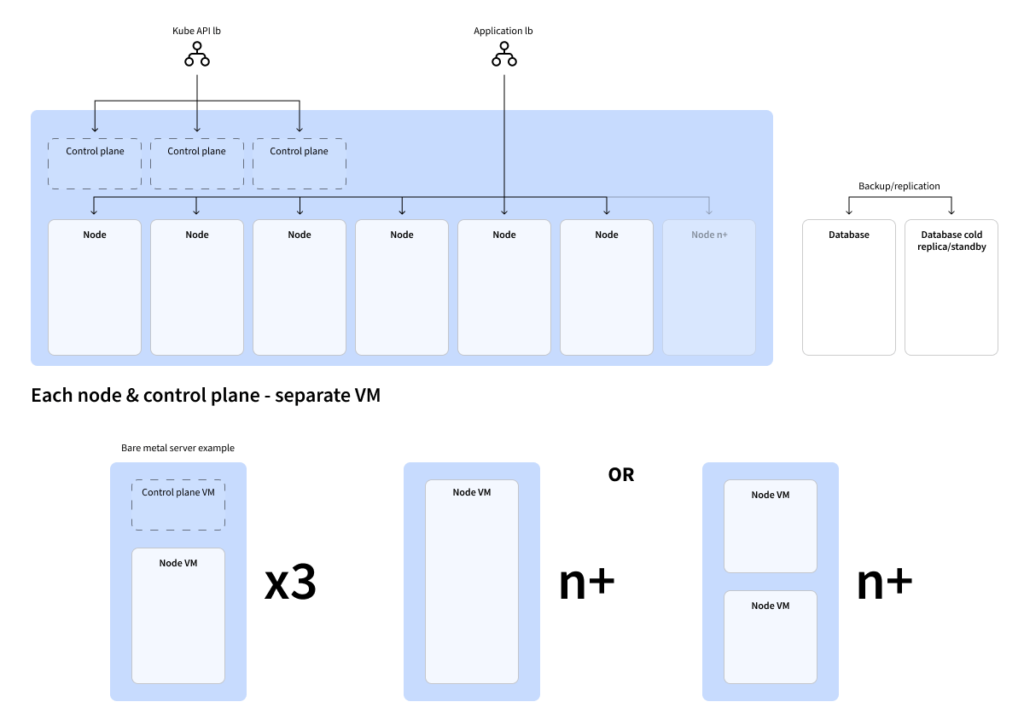
- Kubernetes as the core platform. All services run inside the Kubernetes cluster.
- Two types of nodes inside the cluster: control-plane nodes keep operations coordinated; worker nodes actually run the applications and microservices.
- Three separate control-plane nodes for reliability hosted on separate virtual machines.
- Each component runs on its own virtual machine. Even if several VMs share the same physical server, we separated them to ensure the system’s safety.
- Hardware is duplicated for high availability. In the cloud, redundancy is provided by the provider. On-prem, we build it manually, meaning any critical component gets deployed on at least two different physical servers to survive hardware failure.
- A database (e.g., PostgreSQL) has a separate cold replica or backup that is activated when the primary database fails.
Estimating the Budget for a Dedicated Infrastructure
Before suggesting on-premise as a real option, we first needed to check whether it could even make sense financially. To do that, we took one representative cloud configuration and compared it with a roughly equivalent dedicated server configuration. Not to produce a detailed quote, but to understand the general economic direction.
From this starting point, we built a broader estimate:
- Resource requirements for on-prem production are intentionally doubled, since redundancy is not provided by the platform.
- The plan includes both compute nodes and the Kubernetes control plane.
- Each user-growth milestone (around 5k, 30k, 100k users) has its own expected CPU and RAM footprint.
- These footprints were then matched with approximate monthly hosting costs from a dedicated provider.
So, does on-premise compete with the cloud? The answer is: it can, but only at the right scale and with the right expectations. Cloud remains unbeatable for flexibility and ease of scaling. On-prem, on the other hand, becomes attractive once the workload grows and stabilizes, and when the business wants predictable long-term infrastructure costs.
Migration Scope and Estimated Effort
To give our client a clear picture of what moving from cloud to an on-premise environment involves, we broke the migration into a sequence of practical steps. We needed to show the full scope of work, highlight the areas that take the most engineering effort, and make sure the timeline reflects not only configuration time, but also testing, verification, and inevitable pauses between stages.
Step 1: Preparation (~30 hours)
Before anything can be migrated, we collect a complete inventory of the current setup and document every critical detail.
This includes:
- Infrastructure and service inventory
- Kubernetes nodes (control plane + workers)
- PostgreSQL, Redis versions, replication settings, backup strategy
- Docker registry configuration
- Volumes, disks, storage paths
- External integrations (DNS, SSL, third-party APIs)
- Hardware procurement (client-side, ~15 hours)
- Servers with enough CPU, RAM, and storage to match (or exceed) cloud resources
- Network equipment (switches, firewalls)
- High-speed SSD/NVMe storage
- Dedicated backup and logging storage
- Initial physical server setup (~7 hours)
- Installing a minimal, hardened Linux distribution
- Applying security patches and baseline configuration
Step 2: Base Environment Setup (~60 hours)
Once the hardware is prepared, we build the core of the new platform:
- Virtualization or containerization platform (~12 hours)
- Installing Kubernetes (kubeadm/k3s) based on current cluster characteristics
- Configuring the Container Runtime Environment (containerd/CRI-O)
- Installing and Configuring the Database (~8 hours)
- Installing PostgreSQL and configuring replication
- Configuring ElasticSearch, Redis, and RabbitMQ (~15 hours)
- Configuring clustering
- Optimizing configurations based on current usage data
- Monitoring and logging (~15 hours)
- Grafana, Prometheus, Zabbix (full-stack monitoring)
- Centralized logging system (ELK/EFK stack)
- Configuring security gateway & WAF (~10 hours)
- Web application firewall, security gateway (e.g., ModSecurity, Cloudflare WAF On-Premise)
Step 3: Data Migration (~15 hours)
Data moves only after the new environment is ready and verified:
- Database migration (~7 hours)
- Backup + restore of test PostgreSQL instance
- Backup + restore of Redis (AOF/RDB)
- Full snapshot of databases and services (~4 hours)
- Final recovery & consistency check (~4 hours)
- Restoring PostgreSQL and Redis on local servers
- Checking data consistency
Step 4: Application Migration (~15 hours)
Next, the application stack is deployed inside the new cluster:
- Deploying all Kubernetes manifests (modules, services, deployments)
- Setting up persistent volumes
- Verifying ConfigMaps and secrets
- Functional testing for all web, mobile, and admin applications
- Running smoke tests on critical flows
- Repointing DNS and CDN to the new infrastructure
Step 5: Testing & Verification (~30 hours)
This phase ensures the new environment isn’t just running but running reliably:
- Functional and availability testing
- Stress and load testing
- Backup and disaster recovery workflow testing
- Documenting the effect of network latency compared to the cloud
Step 6: Infrastructure as Code Automation (~25 hours)
To make the setup reproducible:
- Preparing Ansible scripts for OS, Kubernetes, PostgreSQL, Redis, Docker registry
- Testing automation scenarios end-to-end
Step 7: Production Preparation (~5 hours)
- Final data sync before going live
- Making sure the environment is fully production-ready
Step 8: Post-Deployment Monitoring (~20 hours)
For the first days after launch, the environment requires closer observation:
- Monitoring infrastructure health
- Fine-tuning performance using real metrics
Additional Considerations
- Latency. On-premise infrastructure typically introduces slightly higher latency compared to cloud deployments. We highlight this early so that routing and network optimization can be planned in advance.
- Security. It’s necessary to ensure that a robust WAF is implemented and regularly updated to mitigate potential security risks.
Total Estimated Effort
- ~200 hours of engineering work
- ≈ 10 weeks, including testing and waiting periods
Conclusion and Recommendations
Our client is entering a serious growth phase, expanding to new markets and raising the bar for performance, reliability, and compliance. After reviewing the current infrastructure, its costs, and the associated risks, we outlined the strengths and weaknesses of both directions, staying in the cloud or moving to dedicated servers, and shaped a strategy that supports the company’s long-term plans.
If Our Client Continues in the Cloud (DigitalOcean)
Advantages:
- Fast to launch and easy to maintain day-to-day.
- Many built-in tools and automation features that reduce operational overhead.
Risks:
- If the data center has an outage, they’re tied to the provider’s response and SLA; there are no availability zones to spread the workload.
- Our client pays not only for compute and storage, but also for every gigabyte of inbound and outbound traffic, including internal traffic between services.
- Building strong redundancy, regional isolation, or GDPR-aligned setups becomes more difficult and more expensive.
If the Project Moves to Dedicated On-Premise Servers
Advantages:
- Full control over infrastructure, security, and data.
- No traffic fees—our client only pays for the hardware itself.
- Flexible architecture: they can design redundancy, shard databases per region, or implement custom policies without cloud limitations.
Risks:
- Our client must duplicate infrastructure to achieve the same level of reliability.
- The team becomes responsible for updates, monitoring, and disaster recovery.
- More technical involvement is required from our client’s engineers or a partner like IT Outposts.
Our Recommended Hybrid Approach
We recommended a hybrid architecture that balances cost, performance, and resilience:
- Dedicated servers in key regions (six zones): Europe, USA, Singapore/Hong Kong, Australia, South Africa, Brazil. These locations host the production workloads, bringing lower latency and full independence from cloud outages.
- Cloud resources used only for shared, non-critical components. Centralized monitoring, admin tools, API gateways, and staging environments remain in DigitalOcean (or any other cloud).
- Automation and ongoing support. Deployment, monitoring, backup strategies, and failover are handled through Kubernetes, Ansible, and a standard set of infrastructure tools, ensuring consistency across all regions.
Next Steps
With the expansion plan outlined and the cost models compared, our client’s next move is the following.
Choose a Scaling Strategy That Fits Both the Product Roadmap and the Company’s Long-Term Ambitions
The decision comes down to three core options:
- Continue using DigitalOcean, but with targeted optimizations to reduce costs and improve stability
- Move to dedicated servers (on-premise) for full control, predictable expenses, and stronger regional isolation
- Adopt a hybrid model, where production workloads run on dedicated hardware while shared components remain in the cloud
Defining the Regional Strategy Outside Europe
The European environments are already deployed; they’re technically ready but not yet handling live traffic. For the next stage, our client needs to outline the exact regional setup for global markets:
- United States. Selecting specific zones for the first rollout.
- Asia (Singapore or Hong Kong, depending on latency and compliance needs)
- Australia (Sydney)
- Africa (South Africa)
- Latin America (Brazil)
These locations ensure that users interact with services hosted physically close to them, reducing latency and improving reliability.
Identifying What Stays in the Cloud
Some components make more sense to keep centralized, regardless of how production environments evolve. As part of the next steps, we recommend reviewing which services should remain in the cloud for convenience and efficiency:
- Admin tools
- Reporting systems
- Monitoring
- Backups and archival storage
Meanwhile, core production services, the ones that directly impact user experience, should be placed as close to users as possible on dedicated servers.
Preparing a Phased Migration Budget
To make the transition smooth and predictable, our client will need a step-by-step budget that includes:
- Infrastructure costs (hardware, hosting, and maintenance)
- Operational expenses tied to running and supporting multiple regions
- Ongoing support from the IT Outposts team: DevOps expertise, automation, backup solutions, and failover setup
This expansion plan gives our client a clear path from where the platform is today to where it needs to be as it grows across Europe and beyond.
If your product is also preparing for rapid growth, just reach out, and we’ll explore your goals and design a scaling strategy that fits.

I am an IT professional with over 10 years of experience. My career trajectory is closely tied to strategic business development, sales expansion, and the structuring of marketing strategies.
Throughout my journey, I have successfully executed and applied numerous strategic approaches that have driven business growth and fortified competitive positions. An integral part of my experience lies in effective business process management, which, in turn, facilitated the adept coordination of cross-functional teams and the attainment of remarkable outcomes.
I take pride in my contributions to the IT sector’s advancement and look forward to exchanging experiences and ideas with professionals who share my passion for innovation and success.