
Contents
Building an MVP used to take months. Now, with AI tools, simple prototypes can be created over a weekend and a cup of coffee. Full MVPs can take just weeks.
And once the code can be written that fast, infrastructure management becomes an obvious next candidate for optimization with AI. Deploying code, monitoring clusters, scaling services, responding to incidents. AI agents are already taking on parts of this work.
We’ve been discussing AI in infrastructure internally with our engineering team, and we realized the topic deserves more than a Slack thread. Here’s our take on AI in DevOps: where it helps, where it can become risky, and whether you still need engineers running your infrastructure.
What AI Agents Actually Do in DevOps Today
A couple of years ago, writing infrastructure code meant sitting down with Terraform or Kubernetes docs and producing YAML line by line.
Today, AI tools let you describe infrastructure needs in plain language to generate initial configs. That’s what GitHub Copilot, Pulumi AI, and StackGen are doing. If your team used to spend hours writing boilerplate, the difference can be hard to ignore.
Something similar happened with monitoring. The previous experience during an outage was your on-call engineer getting two hundred notifications in twenty minutes, most of them duplicates or downstream effects of the same root issue, and spending the first fifteen minutes just figuring out what actually broke.
The newer AI modules in observability platforms correlate these signals, group related alerts, and try to point you toward the origin faster.
Even test selection in CI/CD can be managed via AI, as models identify which tests are most relevant to a specific code change.
AWS and Microsoft have introduced dedicated DevOps/SRE agents over the past few years to investigate incidents, suggest root causes, and trigger automated fixes in configured workflows.
These capabilities sound promising. But product demos tend to show the best-case scenario. They don’t show you what happens when an agent makes the wrong call during a Friday-night incident, and the team only notices after the weekend.
So, before you hand AI the keys to your infrastructure, it’s worth understanding what risks come with it.
AI Is Prone to Its Own Kind of Mistakes: The AI Factor
We’re already familiar with the human factor: for instance, people may lose focus when too many things demand their attention at once.
And now that some of our routine tasks are being handed off to AI, be it code writing or email drafting, maybe it’s time to think about a parallel concept. That’s exactly what IT Outposts’ CEO and Co-Founder, Dmitry Vishnev, suggested during our internal meeting:
“We have the human factor. Soon we’ll have the AI factor—AI is prone to its own kind of mistakes.”
You’ve probably already seen this AI factor yourself, not necessarily in an infrastructure context. For example, AI tends to hallucinate. Ask ChatGPT to verify something, and it can answer incorrectly, often with more confidence than humans may have when they know they’re right.
Here’s what we observe forming the AI factor overall.
Hallucinations
Hallucinations may not just result in a wrong answer in a chat window. When you use AI for infra management, depending on what permissions the agent has, hallucinations can result in the wrong action.
And this action can affect your whole production environment and take down the entire service.
Lack of contextual judgment
Even when you provide an AI agent with the context, it may interpret it differently than a human would. It follows documented rules literally but can miss the unwritten ones your team just knows from experience.
Yes, you can always add more rules, more exceptions. But your team may have dozens of these small contextual details, and you may not always realize which ones need to be written down until the agent acts in an unexpected way because no one thought to document this exact scenario.
No intuition
And unlike a seasoned engineer who might sense that something is about to go wrong before there’s any concrete evidence of a problem, AI has no such instinct.
It can detect patterns in large datasets and flag anomalies, but this is pattern matching, not judgment. If the data doesn’t say stop, it keeps going.
So the AI factor is real. The practical question is whether teams are willing to develop the frameworks to manage this factor when speed is the priority.
Teams Adopt AI Faster Than They Learn to Control It
We’ve learned how to manage the human factor reasonably well. Aviation is a good example: there are limits on how long pilots can fly before they rest, clear rules for how crews communicate in a crisis, and more.
But it took decades of real incidents before these practices became standard. When it comes to AI, it’s already doing its work in numerous production environments. But is it being approached carefully enough?
According to Deloitte’s 2026 AI report tracking adoption and impact, agentic AI adoption is accelerating:
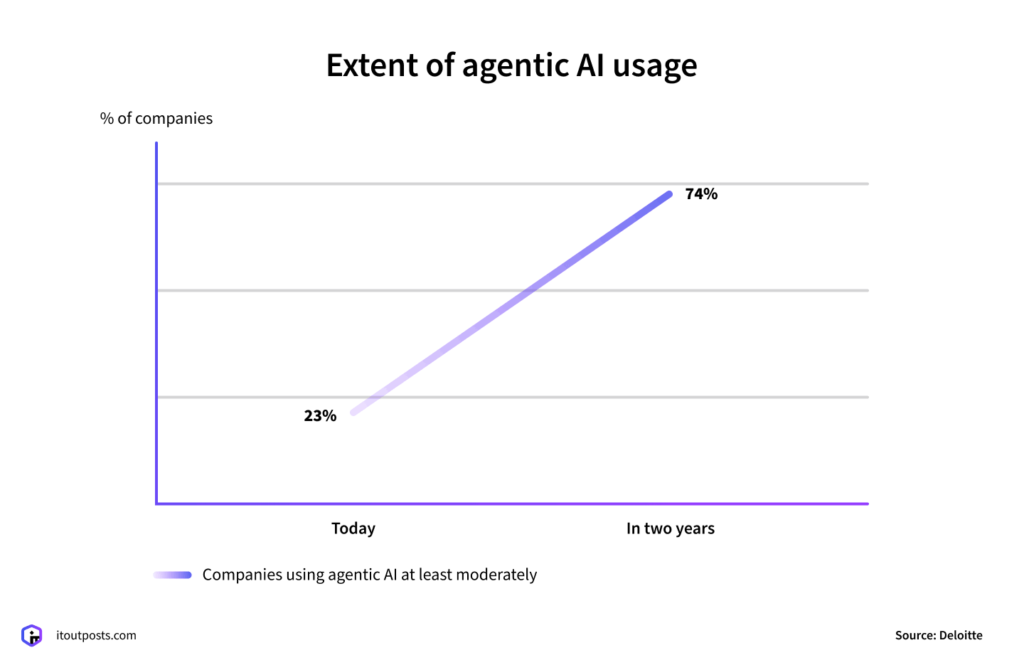
However, companies aren’t keeping enough control over how AI is used: only one in five organizations has a mature approach to governing autonomous AI agents.
Hillary Baron, AVP of Research at the Cloud Security Alliance, sees the same pattern:
“AI agents are already operating at scale as part of the enterprise digital workforce, but security and governance haven’t kept pace with their autonomous actions.”
And it shows:
The Cloud Security Alliance’s study found that 53% of organizations had AI agents act beyond the intended permissions. And 47% reported at least one security incident caused by an AI agent over the past year.
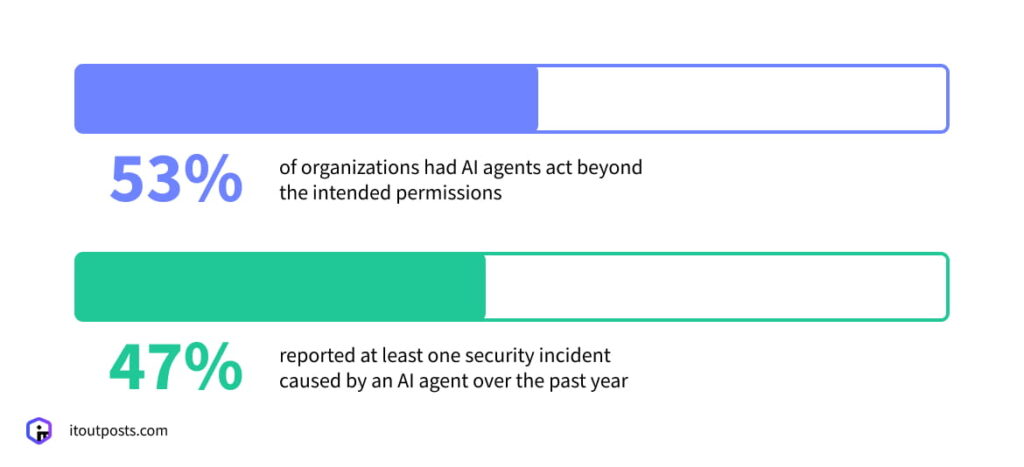
Usually, teams simply don’t take the time to define the boundaries. AI tools are adopted because they promise speed, and stopping to set permissions may feel like it contradicts the whole point. Controls often appear only after the first problem.
The traceability problem: AI can be hard to explain
And even when the incident occurs and the need for controls becomes undeniable, another question comes up: how do you actually learn from an AI mistake?
The same study above also highlights that organizations struggle with action traceability.
When your infrastructure is managed by people, you have logs, audit trails, and version history. If a service goes down, you can trace the chain: this config was changed at 3:14 AM, by this person, as part of this deployment.
The mistake might be costly, but at least it’s explainable. You can reconstruct what happened, learn from it, and adjust.
Commercial AI tools often don’t expose their full reasoning. An agent takes in context, produces a recommendation or takes action, and the reasoning behind this choice may not be fully visible. Why did the agent choose this action over that one? You often can’t answer questions like this.
If you’re building your own AI system with custom logging and observability systems around each step, you have a better chance of tracing what went wrong and preventing it next time.
But when a black box makes a mistake in your production environment, debugging it is a fundamentally different exercise than reviewing a human engineer’s decision.
This is what makes the case for approaching AI carefully even stronger: we’re used to learning from mistakes. AI doesn’t always let you do that.
The AI Speed Is Real. So Are the Tradeoffs
The speed that AI tools provide is appealing. And at the early stage, when you need to roll out a product quickly and cheaply, it can genuinely make sense to lean on AI for parts of the workflow.
Some teams manage AI-assisted infrastructure for months without a serious incident. How well AI works out in your particular case depends on more than the AI itself. Your product, its scale, the data involved, and how much risk your business can absorb can all play a role.
If your internal tool goes down for an hour, this may be manageable. But if a customer-facing product experiences downtime, and this costs you transactions and trust, the stakes are different.
But overall, as we’ve seen, AI agents can make mistakes you didn’t anticipate, in ways that are hard to trace.
As Nataliya Piskun, COO at IT Outposts, summed it up:
“The fewer experienced engineers you have watching your infrastructure, the more likely these mistakes are to happen and the longer they may go unnoticed.”
Why AI Agents Can’t Replace DevOps Engineers
AI agents can’t fully replace DevOps engineers because, as we’ve discussed, AI isn’t a reliable partner on its own. It hallucinates, it lacks context, it doesn’t always explain its reasoning.
And sometimes the speed and cost savings you get at the beginning can end up costing you more when uncontrolled AI agents start creating problems down the line.
But AI does bring changes to DevOps. It’s transforming a DevOps engineer’s role and, in our view, makes it more important.
DevOps engineers have context about your system that AI simply doesn’t have
AI models can process whatever is documented. But not every decision made over the lifetime of a project ends up in a doc, and this context can be exactly what you need during an incident.
DevOps engineers define the boundaries for AI itself
Someone actually has to decide what the AI agent can access and what it can’t. DevOps engineers configure the permissions, build the approval workflows, design the monitoring that helps reveal an agent acting outside its scope.
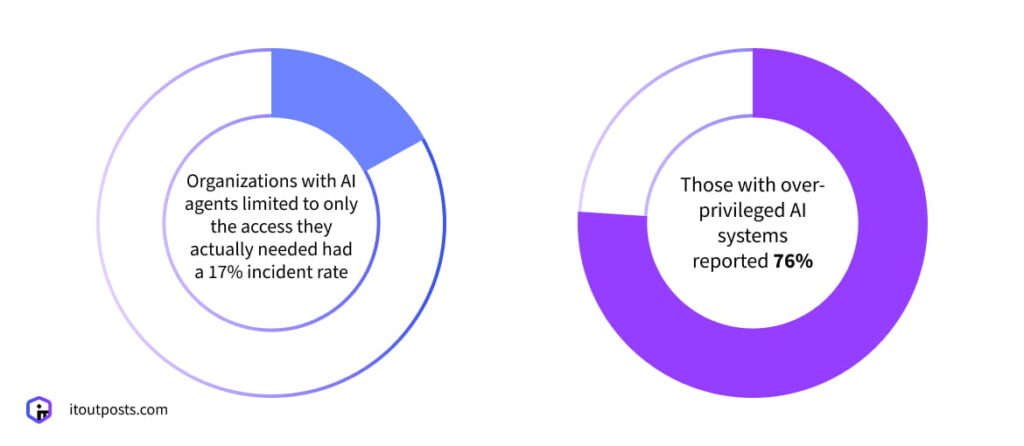
The 2026 State of AI in Enterprise Infrastructure Security Report says that organizations with AI agents limited to only the access they actually needed had a 17% incident rate. Those with over-privileged AI systems reported 76%.
DevOps engineers set the benchmarks that keep AI agents in check
Service level objectives (SLOs) and error budgets existed before AI agents entered the picture. But they become even more critical now.
When an AI agent regularly makes changes to your system in the background, how do you know whether these changes actually help improve your system performance or cause problems?
You need a measurement framework to determine this. That’s what SLOs (e.g., 99.9% uptime over 30 days) and error budgets (how much room for failure is acceptable) are for.
Your DevOps (or SRE) engineers can and should define them, build the monitoring to track them, and detect in time when an AI agent’s actions start pushing metrics in the wrong direction.
Does IT Outposts Use AI?
This depends on the type of activity. Our team doesn’t use AI to deploy clusters. We already have automated scripts, and AI would simply be replacing one tool with another, taking roughly the same amount of time. There’s no real gain.
Generally, the main principle for us is that AI analyzes, it doesn’t intervene.
We give AI agents restricted access, just to observe and flag problems. The agent can tell us there’s a problem and even suggest a solution. That’s useful. But the decision on what to do about it stays with our engineers.
Because the fix that looks right based on available data and the fix that’s actually right for this specific system, at this specific moment, with this specific business context, aren’t always the same thing.
Overall, when it comes to software delivery and infra management in general, we look at each process individually and ask: Does AI actually add value here?
If you’re considering adopting AI, it’s worth asking: will it actually solve a problem or just replace one risk with another?
And if you’re already asking this question, we can assist with finding the answer. Our team can assess your workflows, identify where AI genuinely adds value, and where the investment might not be worth it.
Sometimes the answer is AI. Sometimes it’s a well-built automation that does the job without the extra risk.
Talk to our IT Outposts team about AI in your infrastructure!

I am an IT professional with over 10 years of experience. My career trajectory is closely tied to strategic business development, sales expansion, and the structuring of marketing strategies.
Throughout my journey, I have successfully executed and applied numerous strategic approaches that have driven business growth and fortified competitive positions. An integral part of my experience lies in effective business process management, which, in turn, facilitated the adept coordination of cross-functional teams and the attainment of remarkable outcomes.
I take pride in my contributions to the IT sector’s advancement and look forward to exchanging experiences and ideas with professionals who share my passion for innovation and success.